



Software Development Business|WMS・OMS・ERP・Customs Clearance Systems
Manage stock and orders with WMS. Connect your own ERP through the API, upload an Excel file or enter orders on the website.
What we offer
- API integration requires your own company management system (ERP) and programming skills.
- After the business arrangement is agreed, we provide the Token and API documentation. You develop the integration yourself.
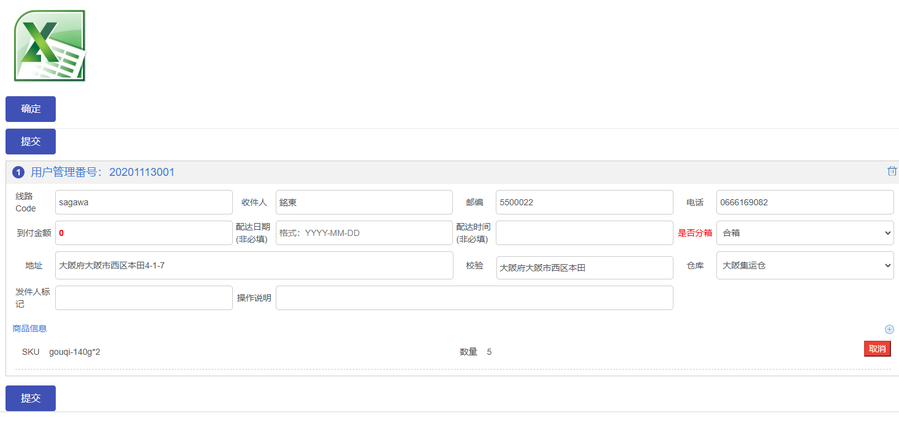
- You can also upload orders in bulk using the specified Excel template or enter them on the WMS website.
- TEMU orders support official real-time synchronization. Stay tuned for integration with other e-commerce platforms.
How systems support the logistics process
| System area | Business purpose |
|---|---|
| WMS: inventory and warehouse operations | Track stock quantities for each product and record goods coming into and leaving the warehouse. |
| OMS: order processing | Receive orders, instruct the warehouse to ship them, and check their progress. |
| Declaration and transport information | Prepare the cargo information needed for customs declarations and transport. The system receiving the information does not mean the goods have cleared customs. |
Using our WMS
Warehouse customers can use our standard WMS free of charge. Enter orders on the website or upload them in bulk using the specified Excel template.
To send orders from your company’s ERP, you need programming skills and must develop the integration yourself. Once the business arrangement is agreed, we provide the Token and related integration information.
Connecting your own system is different from connecting an e-commerce platform. We currently support TEMU. Stay tuned for integration with other platforms.
View the warehouse API integration guide →WMS screen examples
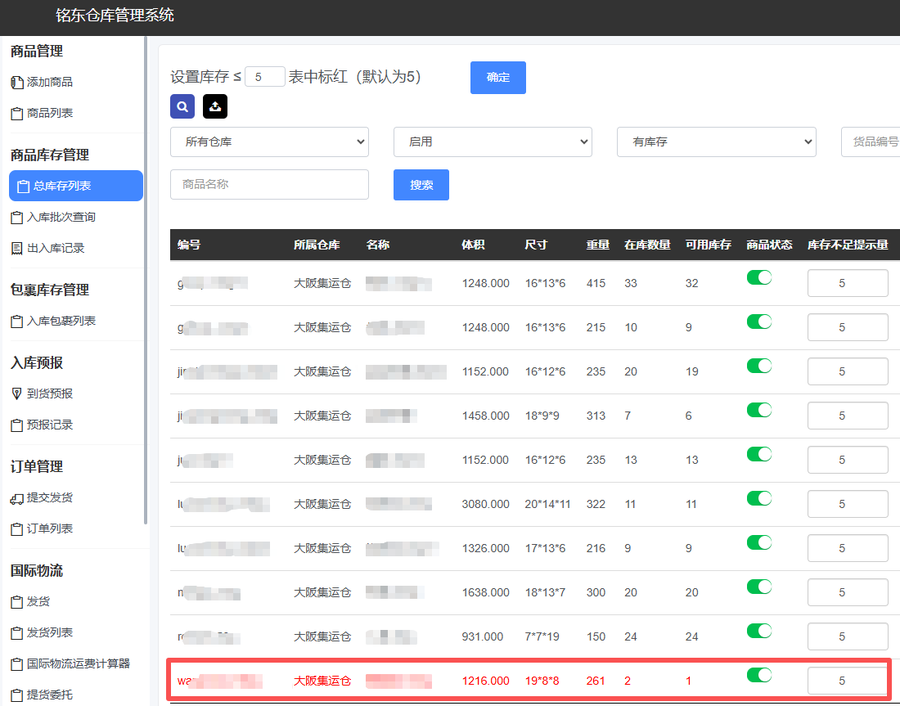
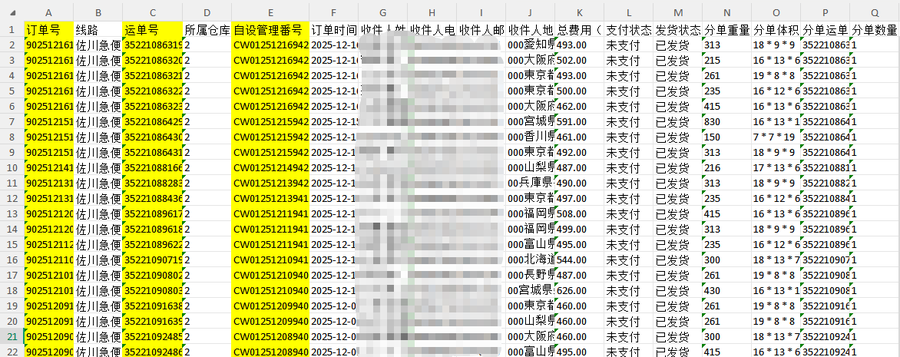
See the actual inventory, order entry and data export screens. Select an image to view it full size.
WMS + OMS — what the system can do
Inventory and warehouse movements
Review stock quantities and receipt/dispatch records by SKU to support replenishment, stock checks and inventory management.
Order management
TEMU orders synchronize automatically. Orders can also come from your own system via API, an Excel template or manual entry on the website.
Dispatch operations
Connect orders with picking, checks, packing, labeling and dispatch, and follow their processing status.
Returns and restocking
Record receipt, inspection and classification of returns according to your instructions, with appropriate restocking and redispatch arrangements.
Integration and synchronization
Connect your own management system using the API token (key) we provide. TEMU order and inventory data synchronize in real time.
Data exports and reports
Review and export orders by date, status and other criteria for dispatch reconciliation and day-to-day analysis.
How it works
- Choose how to enter orders
If you have your own ERP and programming skills, you can choose the API. Excel uploads and manual entry on the website are also available.
- Agree the business arrangement and get the instructions
After agreeing the business arrangement with your representative, get the instructions for your chosen method. API customers receive the Token and API documentation.
- Prepare and check your orders
Build the integration using the API documentation or prepare orders in the template. Check that products, quantities and recipient details are correct.
- Start using WMS
Send orders to WMS and check your stock and order progress.
Frequently asked questions
Is connecting my own system the same as connecting an e-commerce platform?
No. Integration with your own system connects your ERP to our WMS. This is separate from connecting an e-commerce platform.
Which e-commerce platforms do you currently support?
We currently support TEMU. Stay tuned for integration with other platforms.
How do I submit inbound or outbound warehouse orders?
Enter orders manually in the WMS web interface or import them in bulk using the specified Excel template. These options do not require your own ERP or programming skills.
Customers with their own ERP and programming capability can obtain our API Token and specifications after cooperation is agreed. Your technical team develops the integration to push orders to WMS, checks the required fields and tests it before use.
When will I receive the Token and API documentation?
Once you have agreed the business arrangement with your representative, we provide the Token, API documentation and related integration details.
Can I upload order files exported from Shopify or other platforms directly?
First convert the data into our specified template, then upload it. Exported fields and formats differ between platforms, so the original export file should not be assumed to work unchanged. Obtain the current template and check the required fields before starting.
Can I check inventory and inbound/outbound records in WMS?
Yes. WMS shows inventory by SKU and the corresponding records after inbound checks and putaway or outbound processing are completed. We notify customers of completed receiving as agreed. Please contact us promptly if quantities or statuses appear incorrect.